How to Use Distill to Beat Writer's Block
Turn YouTube videos, podcasts, PDFs, and articles into engaging LinkedIn posts. Step-by-step guide to using Propelr Distill to beat writer's block.
Table of Contents
- What Distill Does: Turn Videos, Articles, and PDFs Into Posts
- Step-by-Step: How to Use Distill to Create Posts From Any Source
- 1. Choose your source
- 2. Pick your platform
- 3. Set the post length
- 4. Use the angle field (this is what kills writer's block)
- What Works Best as Input When You Turn Long-Form Content Into Posts
- Why This Beats Writer's Block When Creating Content From Videos and Articles
- A Simple Workflow
- What You Get: Review and Publish
- Try Distill in Propelr

Grow your LinkedIn/X
audience now
AI-powered content creation and scheduling for LinkedIn & X.
Try Propelr for FreeWriter's block isn't a creativity problem. It's a starting problem.
You have a head full of ideas from that podcast you listened to, the article you saved, or the research paper you skimmed. But when you sit down to write a post, the cursor blinks and nothing comes out. If you've ever wondered how to turn a YouTube video into a LinkedIn post, convert an article into a social media post, or turn a PDF into engaging content without starting from scratch — that's exactly what Distill does.
Distill on Propelr fixes that. You don't start from zero — you start from something you already care about: a YouTube video, an article, or a PDF. Distill turns it into a platform-ready post in seconds. You edit, add your voice, and publish.
Here's how to use Distill to overcome writer's block and create engaging LinkedIn and X posts from your favorite long-form content.
What Distill Does: Turn Videos, Articles, and PDFs Into Posts
Distill turns any of these into a post ready for LinkedIn or X:
- YouTube videos — Talks, interviews, tutorials, keynotes
- Articles — Blog posts, news, long reads (paste the URL)
- PDFs — Research papers, reports, case studies
You pick the source, the platform (LinkedIn or X), the length, and — most importantly — the angle. The angle is what turns generic extraction into engaging content that sounds like you.
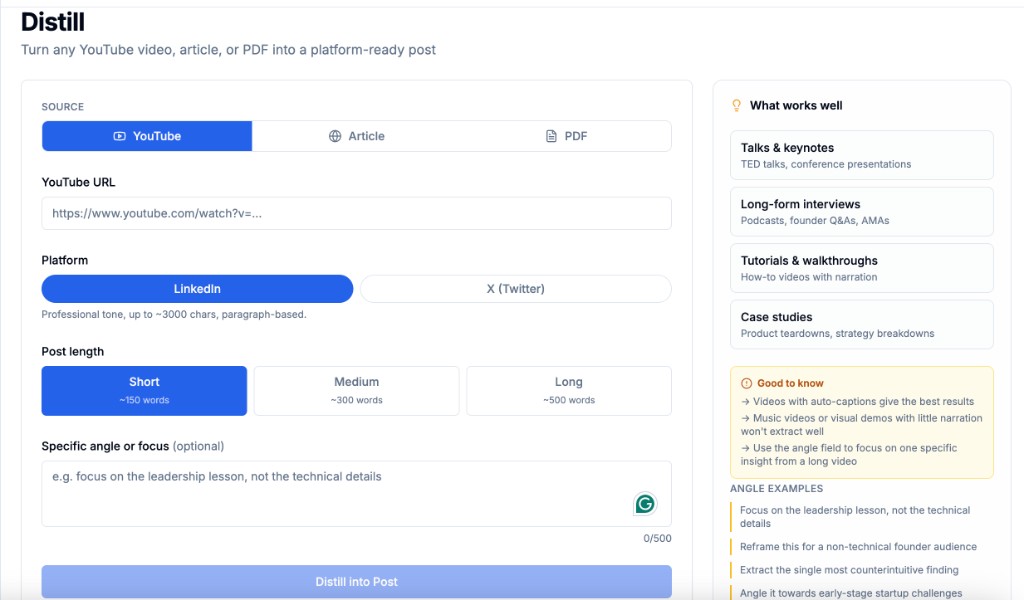
Distill in Propelr: choose your source, platform, length, and a specific angle to get a post that’s ready to edit and publish.
Step-by-Step: How to Use Distill to Create Posts From Any Source
1. Choose your source
- YouTube — Paste the video URL to turn a YouTube video into a LinkedIn post (or an X post). Best when the video has clear narration (auto-captions give the best results). Talks, keynotes, long-form interviews, and how-to videos work great; music or visual-only demos don’t extract well. You can also turn a podcast into a LinkedIn post if the episode is on YouTube.
- Article — Paste the article URL to convert an article to a LinkedIn post or X post. Works for blog posts, news, and long reads.
- PDF — Upload or link to the PDF. Ideal for turning research papers into social media posts, whitepapers, and case studies.
2. Pick your platform
- LinkedIn — Professional tone, up to ~3,000 characters, paragraph-based. Use this when you want a thoughtful, authority-building post.
- X (Twitter) — Punchier, thread-friendly. Use this when you want something scannable and shareable.
3. Set the post length
- Short (~150 words) — One clear idea, great for X or a tight LinkedIn hook.
- Medium (~300 words) — A few points with room for a story or example.
- Long (~500 words) — Full narrative or framework, good for LinkedIn thought leadership.
4. Use the angle field (this is what kills writer's block)
The optional "Specific angle or focus" field is where you tell Distill what to pull out. Without it, you get a generic summary. With it, you get a post that matches your intent.
Angle examples that work:
- "Focus on the leadership lesson, not the technical details" — Great when the source is dense; you want one takeaway for your audience.
- "Reframe this for a non-technical founder audience" — Makes expert content accessible.
- "Extract the single most counterintuitive finding" — Perfect for research or data-heavy pieces.
- "Angle it towards early-stage startup challenges" — Turns a broad topic into something specific and relevant.
You’re not just summarizing — you’re reframing. That’s what makes the output engaging and on-brand.
What Works Best as Input When You Turn Long-Form Content Into Posts
Not every source distills equally well. These tend to give the best posts when you're creating LinkedIn posts from videos or converting long-form content:
| Source type | Examples |
|---|---|
| Talks & keynotes | TED talks, conference presentations |
| Long-form interviews | Podcasts, founder Q&As, AMAs |
| Tutorials & walkthroughs | How-to videos with narration |
| Case studies | Product teardowns, strategy breakdowns |
Good to know:
- Videos with auto-captions give the best results.
- Music videos or visual demos with little narration won’t extract well.
- For long videos, use the angle field to focus on one insight instead of the whole thing.
Why This Beats Writer's Block When Creating Content From Videos and Articles
- You never start from a blank page. You start from something you already consumed — so the “what do I write about?” question is already answered.
- The angle forces a point of view. Instead of “summarize this,” you’re asking “what’s the one thing my audience should take away?” That’s the same question that makes posts engaging.
- You edit, not create from zero. Tweaking a draft is psychologically easier than generating one. Add a personal story, change the hook, or swap an example — the heavy lifting is done.
- You can batch from one source. One long video or PDF can become several posts (different angles, different lengths). One deep dive → a week of content.
A Simple Workflow
- Save as you consume — When you watch a video or read an article that sparks an idea, drop the link into a list or note.
- Open Distill — When it’s time to write, pick one source from that list.
- Set the angle — One sentence: what’s the one thing you want your audience to get?
- Distill — Generate the draft.
- Add your voice — A personal intro, a different example, or a stronger CTA. Then publish.
You’re not copying. You’re curating and reframing — which is what the best creators do anyway.
What You Get: Review and Publish
After you hit Distill into Post, Propelr generates a draft in seconds. You land on a review screen where you can edit the text, see the character count, and choose what to do next.
The example below is the final output of Distill for a video summarized into a LinkedIn post: a concise, on-angle draft ready to tweak, post now, or schedule.
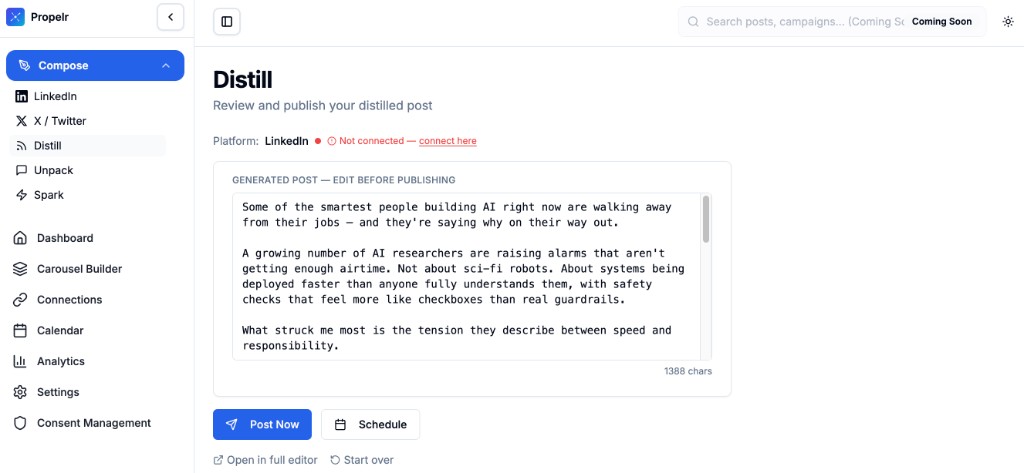
Review and publish your distilled post. Edit in place, then use Post Now or Schedule. Connect LinkedIn or X to publish directly.
Try Distill in Propelr
If you’re tired of staring at a blank screen, Distill is built for you. Want to create engaging LinkedIn posts from YouTube videos, convert blog posts to social media content, or turn research PDFs into posts without the grind? Paste a YouTube link, an article, or a PDF, add an angle, and get a post you can edit and ship in minutes.
→ Try Distill in Propelr — free credits on signup, no card required.
Stop waiting for inspiration. Start from what you’ve already learned, and let Distill turn it into content that works.
Content and growth research team at Propelr
The Propelr team publishes playbooks from inside a content platform used to create, schedule, and analyze thousands of LinkedIn and X posts. Articles are grounded in real usage data and current platform behavior, not recycled advice.
Keep reading
All posts
How to Get Your LinkedIn Posts Cited by ChatGPT (2026)
LinkedIn is the #1 cited domain for professional queries in AI search. What three studies of 2.7M+ citations reveal about getting your posts quoted.

How Often to Post on LinkedIn in 2026 (Real Data)
Buffer's 2M-post study says post more. Everyone else says 2-5x a week. Here's why both are right, and how to find your own ceiling.

Hypefury Alternatives 2026: It Dropped X. Now What?
Hypefury no longer supports X and now costs $6/mo. An honest 2026 guide to what X-first creators should switch to — and who should stay put.