Turn videos, articles, or PDFs into posts
Writer's block isn't a creativity problem — it's a starting problem. Distill turns any source you already engaged with into a draft post in 15 seconds.
Try Distill free →No credit card required
You consume great content. You don't post about it.
Most creators watch hours of YouTube, read newsletter after newsletter, and skim research papers — without turning any of it into content. The gap isn't insight; it's the friction of moving from "this was interesting" to "here's a post about it." Distill removes that friction.
- Long-form content you've already engaged with → your best post material
- Starting from a source kills writer's block — you're not staring at a blank page
- AI rephrases for the platform (LinkedIn vs X format differs significantly)
- You add the voice and the specific angle; AI handles the structure
How it works
- 1
Choose your source
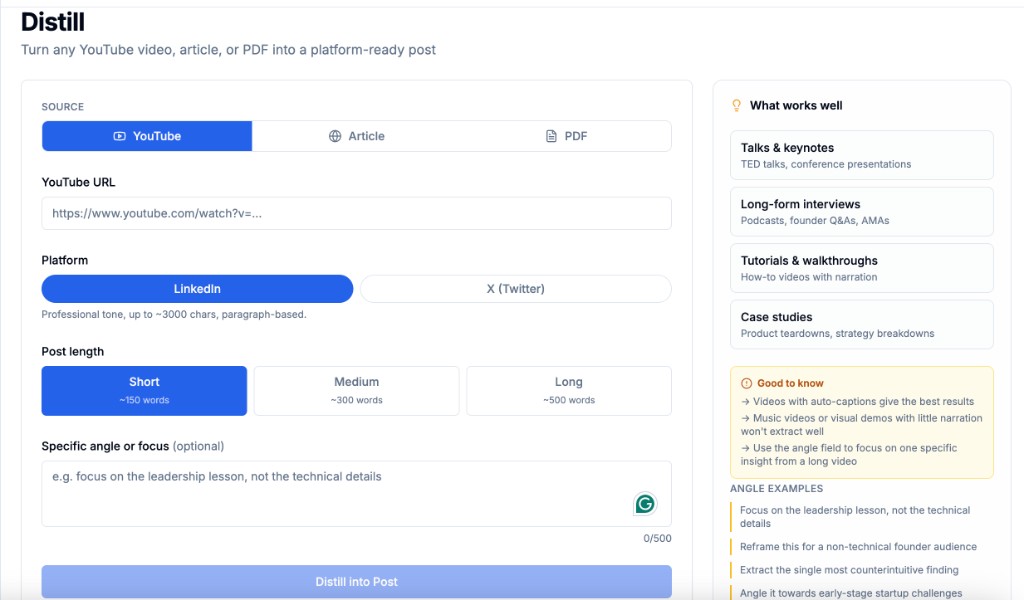
YouTube URL, public article URL, or PDF upload. Distill extracts the content, then runs it through the platform-specific generator.
- 2
Pick platform and length
LinkedIn (~3000 char, paragraph-based) or X (≤280 char, punchy). Short / Medium / Long control fine-tunes the output.
- 3
Add an angle, get a draft
Optional angle field: "focus on the leadership lesson, not the technical details." The angle is what makes the post yours, not the source's.
Capabilities
Three source types
YouTube videos (transcript extraction), public articles (URL fetch), PDF uploads (text extraction).
Platform-specific format
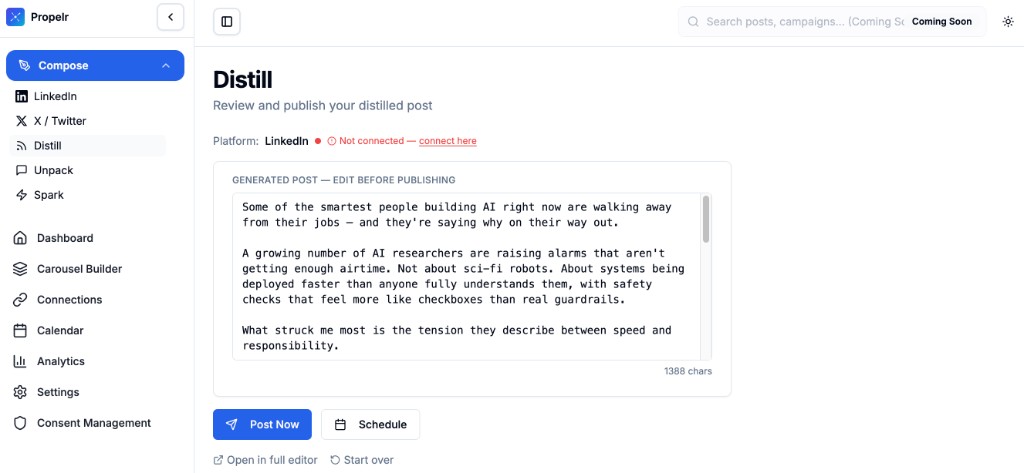
LinkedIn output uses paragraph structure with line breaks; X output uses tight punchy phrasing or threads.
Length control
Short (~150 words), Medium (~300), Long (~500). The AI fits the target without ramble.
Angle override
Tell the AI what to focus on. The source provides the substance; your angle provides the lens.
Voice-trained
If you have Content DNA set, the draft uses your voice. Otherwise it uses a clean default tone.
Edit and refine
Land in the composer with a draft you can edit, regenerate sections of, or post immediately.
Who it's for
Thought leaders with long-form content
Podcast clips, conference talks, YouTube essays — turn each into 3–5 social posts without rewriting from scratch.
Creators who curate
You read newsletters and research. Distill turns "I found this interesting" into "here's my take."
Founders who can't write daily from scratch
You consume 10× what you produce. Distill closes the production gap.
Frequently asked questions
What's the max video or article length?
YouTube videos up to 60 minutes work cleanly. Articles up to ~15,000 words. PDFs up to 25MB. Longer sources get summarized first; the resulting post is still tight.
Does it work with private content?
Public-facing sources only. Distill can't access private YouTube videos, paywalled articles, or password-protected PDFs.
Is my source content private?
Yes. Source text is sent to the AI provider for generation and not retained on Propelr beyond the active session.
Will the AI just paraphrase the source?
Without an angle, it might. The angle field is what reshapes the output into your point of view rather than a summary.
Try Distill free
Turn any YouTube video, article, or PDF into a platform-ready LinkedIn or X post. Stops writer's block by starting from something you already care about.
Try Distill free →